
When File Systems Fail
Last Updated: Sun Apr 19 2026
So I dual boot my computer.
For my everday use, I use Linux (Ubuntu specifically) and for gaming and some video foo I use Windows 11. I’ve got a nice big 8TB drive and I thought it would be a good idea to format the drive using the windows NTFS format, that way both OS’s would be able to share the full space and so on and so on.
Best laid plans and all that.
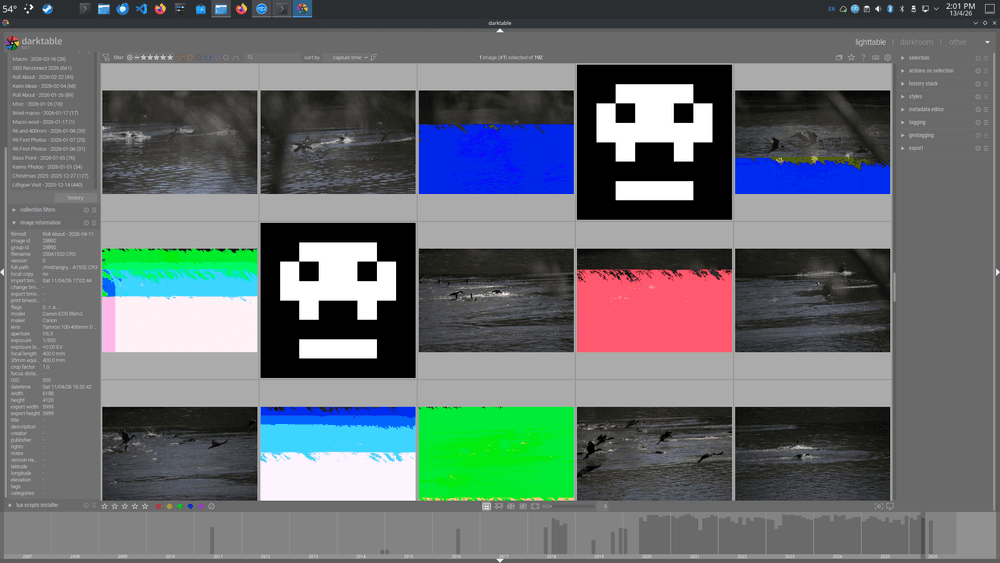
Turns out then when you do this, it causes confusion and dismay and more importantly file corruption. Which I learned the hard way when I went to have a look at darktable and saw what you can see in the header image.
Each skull and colour explosion in that image is a photo that’s been corrupted because switching between Windows 11s version of NTFS and the Linux one has introduced enough chaos to bugger things up.
I’ve scanned the drive to within an inch of its life, and the hardware seems fine.
Sigh.
I have since bitten the bullet that and split the drive between NTFS and ext4, and more importantly I’ve moved the Photos to a shared drive.
Write Speed
Another lesson is double check the write speed of your SD Cards.
Recently got out and took some photos down next to Lake Illawarra, on the way there though I realised that I’d forgotten the SD Card for my camera. No worries I thought, we’ll just duck into JB Hifi on the way and pick up a new one.
I grabbed the card with the highest write speed, but it obviously wasn’t enough because when I tried to take some 4k video, it kept crashing. The video files were playable but there are a lot of dropped frames.
So yeah lesson learnt. Always make sure you know what your minimum specs are so you don’t end up disappointed down the track.